
A PLC splitter should be selected from the optical budget and service plan together. More outputs can connect more branches, but each additional split reduces the optical power available on an individual path.
This guide helps ISP, telecom and system-integration buyers compare 1×8, 1×16 and 1×32 options, evaluate centralized versus cascaded splitting and specify a package that technicians can install and maintain.
Start with the equipment limits and route losses. Then confirm the exact splitter specification, enclosure fit and acceptance tests before placing an order.
What a PLC Splitter Does in a PON
A planar lightwave circuit (PLC) splitter is a passive optical component used to divide an input signal among several output fibers. In a passive optical network (PON), it forms part of the optical distribution network between the optical line terminal (OLT) and the optical network terminals (ONTs). FTTH is one application within the broader FTTx family.
The splitter distributes light; it does not regenerate signals or assign a dedicated Ethernet speed to each subscriber. The PON equipment manages upstream access and shared capacity. A physical output count therefore does not establish the number of subscribers an OLT supports or the bandwidth each subscriber will receive.
A 1×16 device has one input and sixteen outputs. That describes its optical port arrangement, not sixteen powered switch ports. Specify the required ratio explicitly, and confirm that the OLT/ONT combination, network architecture and operating loss range permit the proposed deployment.

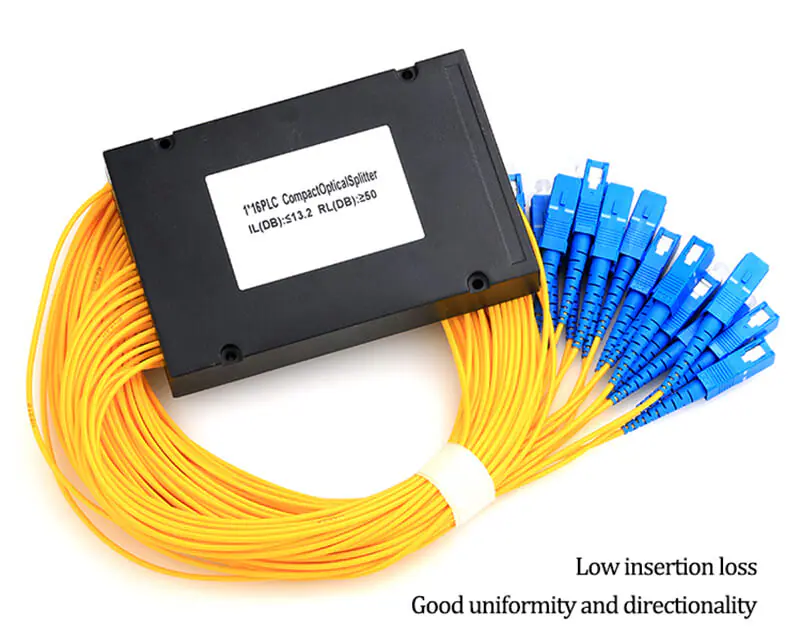
Compare Split Ratios Without Confusing Ideal and Rated Loss
For an equal 1×N split, the ideal splitting loss on one output path is 10 × log10(N) dB. This is a physical calculation for perfectly shared power. It excludes real device excess loss and any additional interfaces included in a supplied assembly.
| Ratio | Ideal loss per output | Planning implication |
|---|---|---|
| 1×4 | 6.02 dB | Fewer branches leave more power available per output. |
| 1×8 | 9.03 dB | Compare the required branch count with route losses and expansion plans. |
| 1×16 | 12.04 dB | Allow for the actual maximum insertion loss, not just this ideal value. |
| 1×32 | 15.05 dB | Check the highest-loss path and equipment limits before adding subscribers. |
These values are mathematical reference points, not Foclink product guarantees. The FOA splitter testing reference distinguishes splitting loss from additional device loss. Doubling the output count adds approximately 3 dB of ideal splitting loss; real assemblies must be evaluated from their specifications.
Buying checkpoint: Ask for maximum insertion loss per path across the specified wavelength and temperature range, and whether connectors are included. Do not add theoretical splitting loss again when the supplied insertion-loss figure already includes it.
Read the Datasheet as a Set of Test Conditions
The useful comparison is between equivalent specifications. Two quotations that list the same split ratio may use different connector arrangements, test wavelengths, temperature conditions or guarantees.
| Specification | Why it matters | What to request |
|---|---|---|
| Maximum insertion loss | Limits the loss allowed through an individual input-to-output path. | Guaranteed value, wavelength range, temperature range and connector inclusion. |
| Uniformity | Shows the difference between the lowest-loss and highest-loss outputs. | A limit and the measurement conditions; do not design from the best output alone. |
| Operating wavelength range | Determines where the stated optical performance is supported. | Coverage for every service and test wavelength used by the project. |
| Return loss and directivity | Address reflected light and isolation behavior. | The relevant limits and sign conventions from the actual datasheet. |
| Package and fiber details | Determine mechanical fit and protection during service. | Case dimensions, lead lengths, fiber/jacket type and permitted handling conditions. |
Corning’s optical component definitions distinguish insertion loss, excess loss and uniformity. In particular, uniformity describes differences between outputs; it is not a replacement for the maximum path-loss guarantee.
For a network carrying multiple PON generations or other optical services, check the entire path, including coexistence filters and connectors. A broad splitter wavelength specification alone does not certify that every other component or the active equipment supports the service plan.
Build the Optical Budget Before Choosing the Final Ratio
Evaluate every relevant direction and wavelength using the selected equipment’s specifications. The longest path is worth checking, but it is not automatically the highest-loss path: a shorter branch can include more connectors, splices or splitting stages.
For a planning calculation, add the specified splitter insertion loss, fiber attenuation, connector and splice allowances, any other passive-device losses and an explicit engineering reserve. Compare the result with the applicable maximum path-loss limit. Separately check the minimum-loss requirement and receiver overload constraints, including short branches.
| Item | Assumed allowance |
|---|---|
| Splitter assembly, maximum insertion loss | 13.5 dB |
| Fiber route allowance | 3.0 dB |
| Other connectors and splices, outside the splitter assembly | 2.0 dB |
| Engineering reserve | 3.0 dB |
| Total planning requirement | 21.5 dB |
| Assumed permitted maximum path loss | 25.0 dB |
| Remaining headroom after the stated reserve | 3.5 dB |
This is an arithmetic example, not a datasheet or a deployment recommendation. The 13.5 dB and 25.0 dB values are hypothetical inputs. A real project must replace every allowance with documented equipment, component and route values. Check whether the selected equipment specification already incorporates any penalties or reserve so they are not counted twice.
The worked total is 13.5 + 3.0 + 2.0 + 3.0 = 21.5 dB. Against the assumed 25.0 dB limit, 3.5 dB remains after the stated reserve. A passing calculation does not replace installation testing or confirm subscriber capacity.
Centralized or Cascaded Splitting?
A centralized arrangement places the main splitting stage at one planned location. A cascaded arrangement distributes splitting across two or more locations. The choice affects feeder/distribution fiber counts, enclosure locations, technician access and expansion sequencing as well as optical loss.
For example, a 1×4 stage followed by a 1×8 stage can provide 32 end branches when all four first-stage outputs feed separate second-stage splitters. Each final subscriber path traverses one 1×4 splitter and one 1×8 splitter, so its splitter loss is the sum of those two path losses. Do not add the losses of all four parallel second-stage units to one subscriber path.
The ideal end-to-end split is 1×32, but the real two-stage loss is not automatically identical to a single-stage 1×32 product. Include the actual devices, inter-stage connections and any different routing. Keep a clear path schedule showing which first-stage output serves each second-stage box.
Architecture checkpoint: Cascading changes where fiber and connection work are needed. It does not create extra optical power or bypass the PON equipment’s supported split ratio and subscriber limits.
For splitter placement and power-budget considerations, use the selected equipment vendor’s design rules to turn an architecture into a supported deployment.
Choose Packaging for the Installation and Maintenance Plan
| Package | Useful where | Confirm before ordering |
|---|---|---|
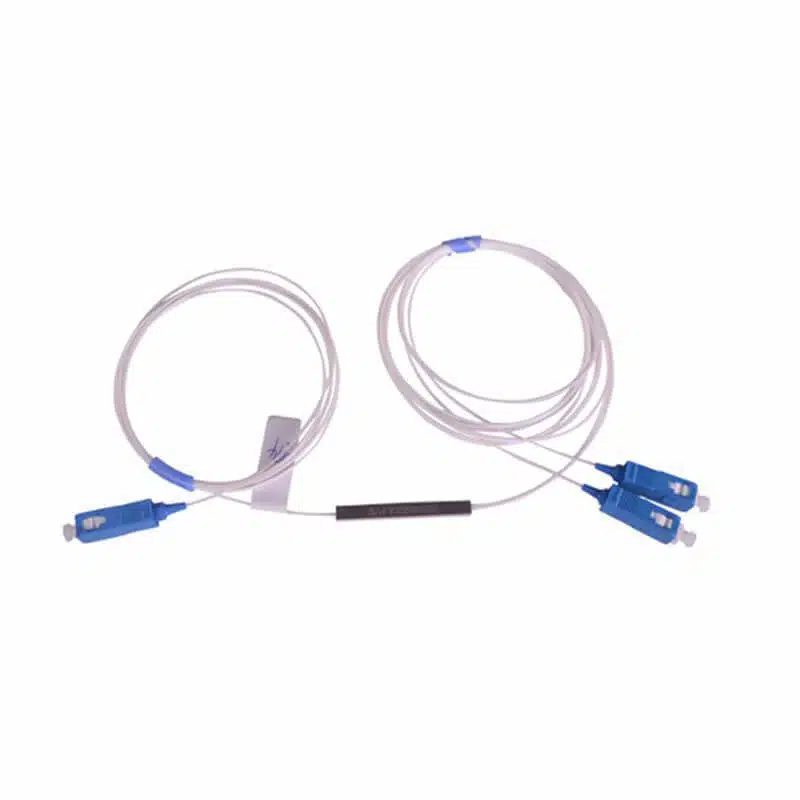
| Compact tube or mini-module | A tray or closure provides the mechanical protection and fiber management. | Mounting method, supported fiber handling, lead protection and splice or connector arrangement. |
| ABS-box assembly | A cabinet or distribution enclosure has room for an enclosed splitter and leads. | Case size, cable exits, service loops and connector access when the lid is closed. |
| Rack-mounted splitter panel | A rack location needs organized front connections and clear port labeling. | Rack format, depth, adapter positions, input location and patch-cord management. |
Packaging names do not establish the complete bill of materials. A compact splitter can be connectorized, and an enclosure may require additional holders or accessories. Ask for a populated drawing that shows how fibers enter, where the input is identified and how the outputs can be serviced.
Use the applicable cable and component bend-radius instructions. A splitter that fits by case dimensions can still be unsuitable if its leads cannot be routed without pinching or excessive bending.

Specify Connector Interfaces and Acceptance Tests
State the connector family and polish at each mating interface. APC and UPC end faces must not be mated directly to each other. Verify the actual component specification rather than relying only on housing color. Include the input and output lead requirements separately when they differ.
For a delivered connectorized assembly, request traceable test records tied to the product identification. Agree on test wavelengths, reference conditions, port numbering and the acceptance limit before ordering. Record each output path rather than accepting a single favorable port as representative of the whole splitter.
On site, inspect and clean connector end faces using suitable equipment, confirm labels and test the completed link against the project acceptance criteria. Never look into a fiber to determine whether it is live. OTDR traces can help locate events, but splitters complicate trace interpretation; use the project’s approved PON test procedure and suitable equipment rather than treating one trace as a complete acceptance record.
Prepare an RFQ That Produces Comparable Quotations
Send the supplier a short network description together with the complete assembly requirements:
- Network: PON technology, selected equipment, required branches and planned splitting locations.
- Optical: ratio, guaranteed maximum insertion loss, relevant wavelength range, temperature conditions and other required performance limits.
- Interfaces: input/output connector type and polish, fiber type, jacket dimensions and lead lengths.
- Mechanical: package, enclosure or rack drawing, mounting accessories and labeling.
- Acceptance: test conditions, output-by-output records, identification and sample approval requirements.
Compare Foclink’s ABS-box PLC splitter, compact 1×2 splitter option and rack-mounted splitter assembly by their confirmed configuration. For the surrounding enclosure, use the fiber distribution box selection guide to check entries, tray access and populated capacity.
PLC Splitter FAQ
Does a 1×32 splitter guarantee support for 32 active subscribers?
No. It provides 32 optical outputs. The supported subscriber count, bandwidth plan and permitted split arrangement must also satisfy the active equipment and network design limits.
Is the ideal loss enough for a purchase specification?
No. Use the supplier’s guaranteed maximum insertion loss under the required conditions. The ideal loss omits real device and potentially connector losses.
Are unused splitter outputs a way to recover power?
Do not assume that leaving ports unused increases the power allocated to active outputs. An equal fixed splitter continues to divide power according to its design; handle unused outputs according to the manufacturer’s instructions.
Can an existing GPON splitter automatically support an upgrade?
Check its documented wavelength range and loss, then verify the entire ODN and the proposed equipment. A splitter label alone cannot establish compatibility for an upgraded network.
Which is better: a centralized splitter or two cascaded stages?
Choose from the optical budget, fiber layout, access locations, growth plan and maintenance needs. Calculate each complete path and compare supported configurations rather than assuming one arrangement is always better.
Select the Splitter as Part of the Complete ODN
A sound PLC splitter selection combines the required branch count with a documented optical budget and a maintainable installation. Confirm the worst-case path, the exact guaranteed component specification and the physical assembly before comparing price.
Send Foclink your ratio, wavelength requirements, budget allowance and enclosure or rack layout. We can discuss a suitable configuration and clarify what the quotation includes.