
Focus on FTTH optical communication system & solution technology

SFP Module Guide: Types, Speeds, Wavelengths and How to Choose the Right Transceiver

SFP modules are compact, hot-pluggable transceivers used to connect switches, routers, servers and other network equipment to fiber-optic or copper links. They are widely used in enterprise networks, data centers, telecom systems, FTTx infrastructure and industrial communication networks.

Choosing an SFP module is not only a matter of matching the port shape. The module speed, wavelength, fiber type, transmission distance, connector type and device compatibility must all match the network design. A mismatch can result in unstable links, no connection, excessive optical loss or reduced transmission distance.

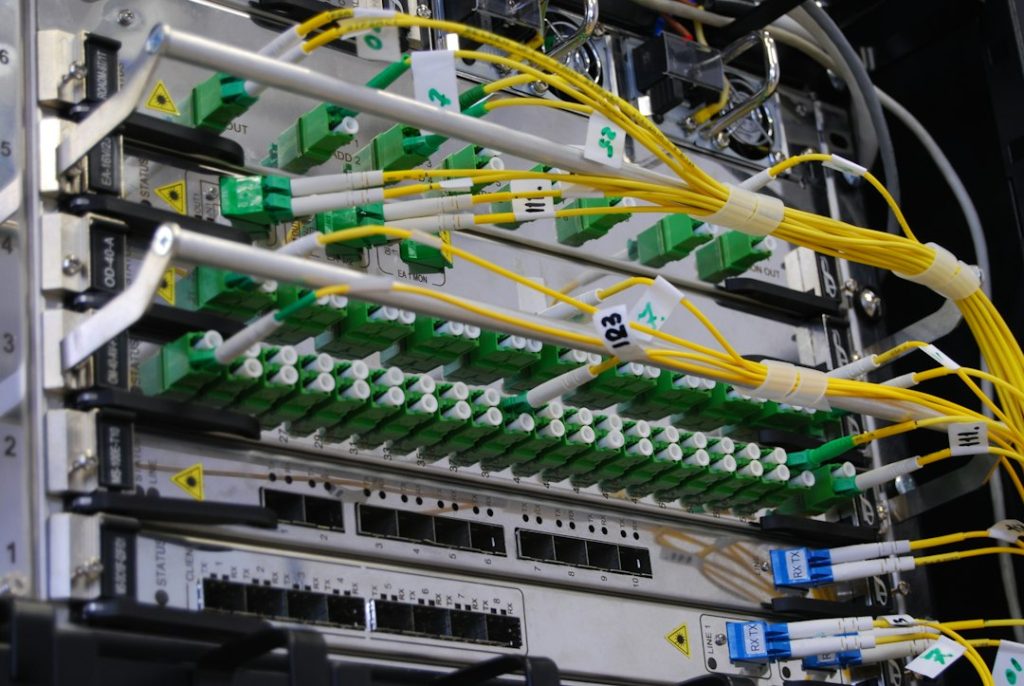
Data center network switch used with SFP and SFP+ optical transceiver modules.
Network switches use SFP-family transceivers to provide flexible fiber or copper uplinks.
Fiber optic network rack showing equipment and fiber connections used with optical transceiver modules.
Fiber links must match the transceiver wavelength, fiber type, connector and reach.

What Is an SFP Module?

SFP stands for Small Form-factor Pluggable. It is a standardized transceiver form factor designed to fit into compatible network ports while converting electrical signals inside the equipment into optical or electrical signals on the transmission medium.

The same switch can often support different SFP modules for different applications. For example, one port may use a short-reach multimode module while another uses a long-reach single-mode module, as long as both modules are supported by the equipment and operate at the required data rate.

Common members of the SFP family include:

  • SFP: commonly used for 100 Mbps and 1 Gigabit Ethernet applications
  • SFP+: widely used for 10 Gigabit Ethernet
  • SFP28: commonly used for 25 Gigabit Ethernet
  • BiDi SFP: transmits and receives on different wavelengths over a single fiber
  • Copper SFP: provides an RJ45 electrical interface instead of an optical connector

SFP vs SFP+ vs SFP28

Form FactorTypical Ethernet SpeedCommon Applications
SFP1GEnterprise access, industrial networks, telecom equipment and legacy Gigabit links
SFP+10GData center uplinks, aggregation switches, servers and metro networks
SFP2825GServer access, leaf-spine networks and higher-density data center links

How to Match Wavelength and Fiber Type

The wavelength must match the fiber type and the module installed at the opposite end. Multimode SFP modules commonly use 850 nm wavelengths and operate over OM2, OM3 or OM4 fiber depending on the standard and required distance. Single-mode SFP modules commonly use wavelengths such as 1310 nm or 1550 nm and operate over OS2 fiber.

BiDi modules are different because the transmit and receive wavelengths are paired. For example, one end may transmit at 1310 nm and receive at 1550 nm, while the module at the opposite end uses the reverse wavelength pair. BiDi modules must therefore be purchased and installed as compatible A/B pairs.

Practical point: Two modules can have the same form factor and speed but still be incompatible if their wavelengths, fiber types or optical budgets do not match.

How Far Can an SFP Module Transmit?

Transmission distance is determined by the optical standard and the complete link budget rather than by the SFP form factor alone. Common short-reach modules may be designed for a few hundred meters over multimode fiber, while single-mode modules can support 10 km, 20 km, 40 km or longer depending on their transmitter power and receiver sensitivity.

Do not select the longest-distance module by default. A high-power long-reach transceiver connected across a very short link may overload the receiver unless an optical attenuator is used. Always check the transmitter power, receiver sensitivity and maximum receive power stated in the module datasheet.

Connector Types: LC, RJ45 and Single-Fiber Interfaces

Most optical SFP modules use a duplex LC connector. The two fibers normally carry transmit and receive signals separately.

  • Duplex LC optical SFP: the most common interface for conventional dual-fiber links
  • BiDi SFP: normally uses a simplex LC connector and sends two wavelengths over one fiber
  • RJ45 copper SFP: converts the SFP port to a copper Ethernet interface for twisted-pair cabling

The cable connector must match the module interface exactly. An LC module cannot connect directly to an SC patch cord without an appropriate adapter or correctly terminated patch cable.

Device Compatibility and DDM/DOM Support

Network equipment vendors may validate transceiver identity, EEPROM coding and supported parameters before allowing a module to operate. This is why a technically correct SFP can sometimes be rejected by a switch even when the speed, wavelength and connector are correct.

For reliable deployment, verify that the transceiver is coded for the intended equipment platform. Also check whether the module supports DDM or DOM monitoring. These functions allow the device to report temperature, supply voltage, transmit optical power, receive optical power and laser bias current, which can be valuable for troubleshooting and preventive maintenance.

SFP Module Selection Checklist

SpecificationWhat to Confirm
Form factorSFP, SFP+ or SFP28
Data rate1G, 10G, 25G or the exact standard required by the port
Fiber typeMultimode or single-mode
Wavelength850 nm, 1310 nm, 1550 nm or the correct BiDi wavelength pair
ReachMaximum link distance and optical budget
ConnectorDuplex LC, simplex LC or RJ45
CompatibilitySwitch, router, server or OLT vendor coding
MonitoringDDM/DOM support when required
Operating environmentCommercial or industrial temperature range

Final Recommendation

A reliable SFP selection process starts with the equipment port and works outward through the entire optical link. Confirm the required speed, supported transceiver standard, wavelength, fiber type, connector, distance and compatibility before ordering.

For new projects, it is also useful to document the exact transceiver model at both ends of every link. This makes future troubleshooting, spare-part planning and network upgrades significantly easier.

Question and answers

Common SFP Module Questions

1 What is the difference between SFP and SFP+?

SFP is commonly associated with 1G links, while SFP+ is commonly used for 10G. They use a similar physical size, but electrical interfaces, supported speeds and device compatibility are different.

2 Can I use a single-mode SFP with multimode fiber?

Normally, no. The transceiver optics and fiber type should match the standard specified for the link. Use multimode modules with compatible multimode fiber and single-mode modules with OS2 single-mode fiber unless the manufacturer explicitly specifies otherwise.

3 Do both ends need the same SFP wavelength?

For conventional dual-fiber optics, both ends normally use matching wavelengths and standards. BiDi optics are the exception: they use complementary transmit and receive wavelengths and must be installed as a matched pair.

4 Why does a compatible-looking SFP not work in my switch?

The switch may reject the module because of vendor coding, unsupported speed, port configuration or an incompatible optical standard. Check the equipment compatibility list and the transceiver EEPROM coding in addition to the physical connector.

5 What does DDM or DOM mean on an SFP module?

DDM/DOM allows the network device to read real-time diagnostics such as module temperature, voltage, laser bias current and transmit/receive optical power. These values can help identify fiber loss, weak transmitters and other link problems.

Contact Us

If you have any requirements for GPON/EPON solutions, network cabling services, wireless communication systems or related fields, please feel free to fill out the form and contact us.

Factory:

21st Floor, Happy Garden Building, 123 Guangming Mountain Road, Nanshan District, Shenzhen, Guangdong.

Scroll to Top