
Choosing a fiber optic distribution box starts with the network layout, not the number printed on the enclosure. A box must accommodate the incoming cable, splices, adapter connections and outgoing drops while keeping fibers accessible and protected.
This guide explains how to compare capacities, decide whether a splitter belongs inside the box and prepare a clear specification for an FTTH or building distribution project.
For procurement, confirm the complete internal configuration. An empty enclosure and a preloaded terminal box can look similar in a catalog while requiring very different installation work.
What Is a Fiber Optic Distribution Box?
A fiber optic distribution box is a passive enclosure used to organize and protect the transition between distribution fibers and connections serving users or downstream equipment. Depending on its design, it can hold splice trays, adapters, pigtails, a splitter and cable management features. It does not amplify light or convert an optical signal into Ethernet.
In an FTTH network, a typical path runs from the optical line terminal (OLT), through feeder and distribution fiber and one or more splitting stages, to drop cables and optical network terminals (ONTs). The location of the splitters depends on the network design. A distribution box may contain a splitter, or it may provide only splicing and patching after a splitter installed elsewhere.
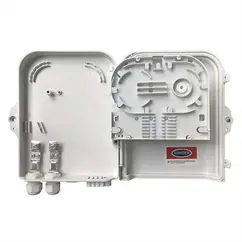
For a building, the box can provide an accessible point for connecting floor or apartment drops. For an outdoor deployment, it may provide a wall-mounted or pole-mounted service point. Terms such as FDB, terminal box, CTO and NAP vary between markets; always compare drawings and functions rather than relying on the product name alone.

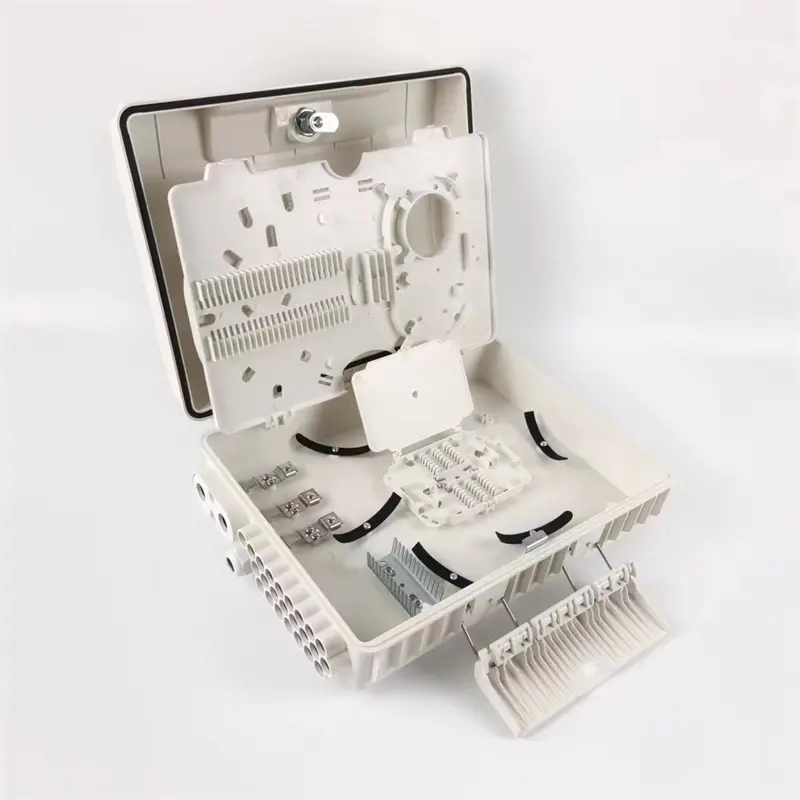
Distribution Box, Splice Closure or ODF?
These products can share functions, but their access arrangements and installation environments often differ. Start with the work technicians need to perform at that location.
| Equipment | Typical purpose | What to confirm |
|---|---|---|
| Distribution or terminal box | Organize distribution-to-drop connections; may combine splicing, patching and splitting. | Subscriber interfaces, cable entries, tray access and optional splitter accommodation. |
| Fiber splice closure | Protect cable joints and managed splices along a cable route. Some designs also support drop connections. | Cable sealing system, splice capacity, re-entry procedure and approved installation environment. |
| Optical distribution frame (ODF) or patch panel | Provide organized termination and cross-connection, commonly in a rack or equipment room. | Rack space, adapter density, patch-cord routing and front or rear access. |
The boundary is not absolute: some enclosures combine several roles. For example, the CommScope FDC2 family supports splicing, patching and splitting. That illustrates why a functional specification is more useful than a label.
Read Capacity as Several Separate Numbers
A “16-port” description does not tell you the complete usable capacity. Ask the supplier to identify what is being counted and show the arrangement with the specified components installed.
| Capacity item | What it means | Procurement check |
|---|---|---|
| Incoming cable capacity | The cables and fibers that can enter and be managed. | Cable diameter, entry count, strength-member fixing and express-fiber routing if required. |
| Splice capacity | The number of protected splices supported by the installed trays. | Tray quantity, sleeves per tray, fiber storage and access to lower trays. |
| Adapter capacity | The supported adapter positions and connector format. | SC simplex and LC duplex positions do not represent the same fiber count; confirm the actual panel layout. |
| Drop cable outlets | The outgoing cables that can be individually secured and sealed. | Compatible drop profile, outlet size, strain relief and sealing of unused entries. |
| Splitter accommodation | Space and routing provisions for a specified splitter package. | Module dimensions, input termination, output routing and remaining service space. |
Selection checkpoint: A box is usable only when its splice storage, adapter layout, cable entries and routing space support the same intended configuration. Do not treat the largest advertised number as a complete system specification.
For example, a project serving 16 premises may initially activate eight drops. The enclosure still needs a planned route for the remaining drops, service loops and future access. If a 1×16 splitter is proposed, confirm where its input terminates and how all outputs are managed. Sixteen adapter positions alone do not prove that the input connection, splitter body and every required splice will fit.
Reserve practical expansion space, but avoid choosing a much larger box without checking the mounting location and technician access. The useful spare capacity is the capacity that remains after the full bill of materials is installed.
Should the Box Include a PLC Splitter?
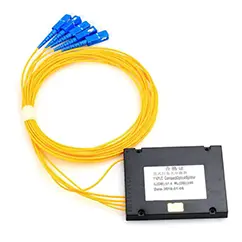
A splitter is needed where the optical network design divides one input among multiple outputs. It is not a mandatory component of every distribution box. In a centralized design, splitting may occur upstream, leaving the local box to connect distribution fibers to drops. In a distributed design, a splitter may be fitted near the served premises.
Choose the split ratio from the complete PON design and optical power budget. Splitting introduces loss, and cascaded splitters contribute cumulative loss along each path. Include fiber attenuation, connector and splice losses, engineering margin and the specified OLT/ONT operating limits. A box with many outlets cannot compensate for an inadequate power budget.
Also confirm the splitter package. Bare-fiber, mini-module and connectorized modules have different mounting and routing needs. A connectorized assembly can simplify access, but its connectors and stored leads occupy space. Ask for a populated layout rather than assuming an enclosure that accepts one splitter package will accept another.
Match Connectors, Fiber Routing and Service Access
Specify the connector family and end-face polish at every mating interface. SC/APC and SC/UPC are not interchangeable mating partners. Connect an APC end face to a matching APC interface and a UPC end face to a matching UPC interface; do not directly mate the two polish types. The Fiber Optic Association connector guidance explains this incompatibility. Housing color is a useful clue, but verify the actual part specification.
Check the pigtail fiber type, splice sleeve dimensions and adapter mounting style as part of the supplied configuration. When comparing quotations, make sure the same items are included; an enclosure-only price cannot be compared directly with a box supplied with adapters, pigtails and a splitter.
Inside the box, fibers should follow the guides without tight bends, pinching or tension when a tray is lifted or the lid is closed. Use the applicable cable and fiber manufacturer’s bend-radius requirements rather than one universal radius. Leave enough managed length for re-splicing and ensure a technician can reach the required connection without disturbing unrelated subscribers.
Indoor and Outdoor Installation Requirements
Indoor selection depends on the building location, access control, cable routing and applicable material or fire-performance requirements. Outdoor selection adds exposure to rain, dust, sunlight, temperature changes and, in some locations, salt or industrial contaminants. Confirm which conditions the complete enclosure assembly is documented to withstand.
An IP rating describes specified ingress-protection testing; it does not by itself establish UV resistance, corrosion resistance, impact performance or suitability for every exposed location. Request the model-specific rating and installation instructions. A rating for the correctly assembled box is not a guarantee when cable seals are mismatched, unused entries are left open or the cover gasket is contaminated.
For pole mounting, verify that the mounting kit suits the pole and keeps cables supported. For wall mounting, check fixing points, available opening clearance and the route of the incoming and outgoing cables. Place the box where maintenance is practical and follow the manufacturer’s entry orientation and sealing instructions.
Outdoor ordering detail: Provide the actual feeder and drop cable dimensions. The correct seal or grommet depends on the cable profile as well as its nominal diameter.
Installation and Acceptance Checklist
- Check the delivered configuration. Match the enclosure, trays, adapters, pigtails, splitter, seals and mounting accessories against the approved bill of materials.
- Secure cables before managing fibers. Apply the specified sheath and strength-member fixing so pulling forces are not transferred to splices or connector leads.
- Organize splices and service loops. Follow the tray routing, retain splice protectors properly and check that movement of a tray does not pull adjacent fibers.
- Inspect, clean and verify connector end faces. Use suitable inspection equipment and the approved cleaning process. Never look into a fiber or connector to check whether it is live.
- Label every route. Record feeder fibers, splice positions, splitter inputs and outputs, adapter positions and drop destinations in a consistent schedule.
- Test the finished paths. Verify continuity and optical loss against the project acceptance criteria. Use the specified test wavelengths and equipment; include OTDR records where the project requires them.
- Close and inspect the assembly. Check seals, unused entries, latch engagement and cable support. Confirm that closing the lid does not pinch fibers.
Keep the test records with the connection schedule and installation photographs. Clear records make later fault isolation and subscriber additions easier, especially when several similar boxes serve the same building or street.
What to Include in a Distribution Box RFQ
A useful request for quotation describes the network task and the complete assembly, not just “16-core outdoor box.” Include:
- Installation location and mounting method, with exposure and access requirements.
- Number and dimensions of incoming cables and outgoing drops.
- Required splice count, adapter format, active connections and planned expansion.
- Connector polish, pigtail fiber type and splitter ratio/package if needed.
- Whether the order is enclosure-only or preloaded, with a line-by-line bill of materials.
- Required documentation, labeling, packaging, sample approval and acceptance tests.
For a connectorized splitter configuration, review Foclink’s 16-core terminal box with 1×16 PLC splitter. For another enclosure size, compare the 32/48-core distribution box product. Treat those names as starting points and confirm the supplied configuration against your project. The broader FTTx solution should determine where each enclosure and splitting stage belongs.
Fiber Optic Distribution Box FAQ
Is a fiber distribution box the same as a splitter box?
Sometimes a product combines both roles, but a distribution box does not necessarily contain a splitter. Check the internal layout and supplied components. A splice-and-patch box can serve fibers already split elsewhere.
Does a 16-port box always serve 16 users?
No. Confirm what the port count refers to, the number of usable drop outlets and the internal routing. Service capacity also depends on the network design, split ratio, equipment limits and optical budget.
Can an indoor distribution box be installed outdoors?
Only if that exact model and configuration are specified for the exposure and installed accordingly. A cover or lock alone does not establish outdoor suitability.
Can SC/APC and SC/UPC connectors be connected together?
Do not mate APC and UPC end faces directly. Specify matching polish at each interface and verify the components before installation.
Should I order an empty box or a preloaded assembly?
Choose an empty box when your team will fit and verify the specified components. A preloaded assembly can reduce on-site assembly, but confirm its exact bill of materials, routing and test documentation before ordering.
Specify the Complete Fiber Handoff
The right fiber optic distribution box provides enough connection capacity, protected routing and service access for the actual installation. Start with the cable and subscriber plan, then verify the populated layout, environmental requirements and optical design together.
Send Foclink your connection schedule, cable dimensions, mounting location and splitter requirements. We can help identify a suitable enclosure configuration and clarify what is included in the quotation.