
A fiber optic patch panel should be sized for the complete connection plan, not just a port number. The front adapter layout, internal splice storage, rack depth and patch-cord routes all determine whether the finished installation is usable.
This guide explains how to compare rack-mounted and wall-mounted panels, count fibers correctly and choose between spliced and preterminated connections. It is written for network buyers, installers and system integrators preparing a clear specification.
Start with the fibers and interfaces you need today, then reserve practical space for changes and maintenance.
What Is a Fiber Optic Patch Panel?
A fiber optic patch panel provides an organized termination and patching point between installed optical cables and removable patch cords. Depending on its configuration, it can hold adapters, pigtails, splice trays or preterminated modules. It is a passive connection point: it does not switch Ethernet traffic or amplify an optical signal.
Panels are used in equipment rooms, data centers, telecom sites, building distribution points and enterprise networks. They help separate the installed cable from routine connection changes, provided the cable is anchored and the fibers are properly managed inside the enclosure.
The terms patch panel, termination box and optical distribution frame (ODF) can overlap in product descriptions. An ODF may refer to a larger frame or organized distribution system, while a patch panel may be one enclosure within that system. Confirm the supplied components and access arrangement rather than assuming the name defines the configuration.

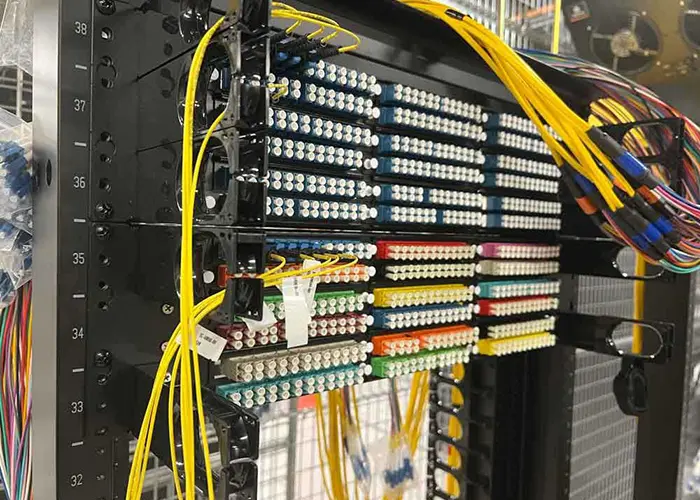
Count Adapter Positions, Fibers and Links Separately
A quoted port count is useful only when its meaning is defined. One adapter position may carry one fiber, two fibers or a multi-fiber connection, depending on the adapter format. Physical capacity and the number of usable network links are separate questions.
| Count | What it describes | What to verify |
|---|---|---|
| Adapter positions | Openings or installed adapters on the front panel. | Connector format, simplex or duplex arrangement and which positions are populated. |
| Fiber capacity | Individual optical fibers that can be terminated and managed. | Pigtails, splice positions, module arrangement and fiber routing space. |
| Splice capacity | Protected splices supported by the supplied trays. | Tray quantity, sleeve holders, access and storage for working fiber length. |
| Network links | Complete connections needed by the equipment. | Fibers per link, interface type and the end-to-end mapping. |
Example: a panel populated with 24 LC duplex adapter positions exposes 48 individual fiber connections. In a design using two fibers for each duplex link, that can provide 24 links if the rear terminations and complete cable paths support them. It does not imply 48 duplex links. A different connector or transmission arrangement changes the calculation.
Ask for a populated drawing and a fiber schedule. A chassis advertised with a high maximum capacity may be supplied with fewer adapters or trays, and spare front openings do not guarantee spare splice capacity.
Buying checkpoint: State the number of individual fibers and complete links required, then list the adapter format and supplied internal components. Avoid ordering from an undefined “24-port” label.
Choose Rack or Wall Mounting from the Service Location
| Mounting | Useful where | Selection checks |
|---|---|---|
| Rack-mounted panel | An equipment rack provides an organized distribution point. | Rack mounting dimensions, available height, usable depth, rear access and front patch-cord routing. |
| Wall-mounted box or panel | A smaller local termination point is needed outside a full rack. | Wall fixing, cover opening, cable entry direction, connector access and protection appropriate to the location. |
| Modular panel | Connections will be organized or expanded in separate modules. | Module interface, actual populated capacity, rear access and availability of the required module format. |
Rack width alone does not establish fit. Check the enclosure depth, rail position, rear cable-entry area and the clearance needed for connector boots. Reserve room for cable managers and the door closing path; a panel that fits between the rails can still leave insufficient space for the connected cables.
For wall mounting, check whether a technician can open the cover and work on the intended termination without pulling adjacent fibers. Specify the actual installation environment. An indoor metal box is not automatically suitable for rain, dust or exposed outdoor use.
Compare Splice-and-Patch with Preterminated Panels
In a splice-and-patch arrangement, the installed cable fibers are typically spliced to pigtails that terminate at the front adapters. This requires suitable trays, sleeve holders, cable fixing and managed fiber storage. The populated layout should show both the splices and the front connections.
In a preterminated arrangement, factory-terminated cables or modules reduce the amount of termination work performed at the panel. They still require the correct connector interfaces, cable length, entry protection and fiber mapping. Avoid assuming that a preterminated module can be connected to any trunk solely because the plugs fit.
For multi-fiber assemblies, verify polarity, connector mating configuration and the mapping from rear interfaces to front ports. Keep the link design consistent through the trunk, modules and patch cords. Record the mapping before installation so a future replacement does not introduce an unexplained reversal.
Choose the method from installation access, available skills, restoration needs and the cable plan. A procurement comparison should include the complete installed assembly and the work needed to make it usable, not only the price of the empty enclosure.
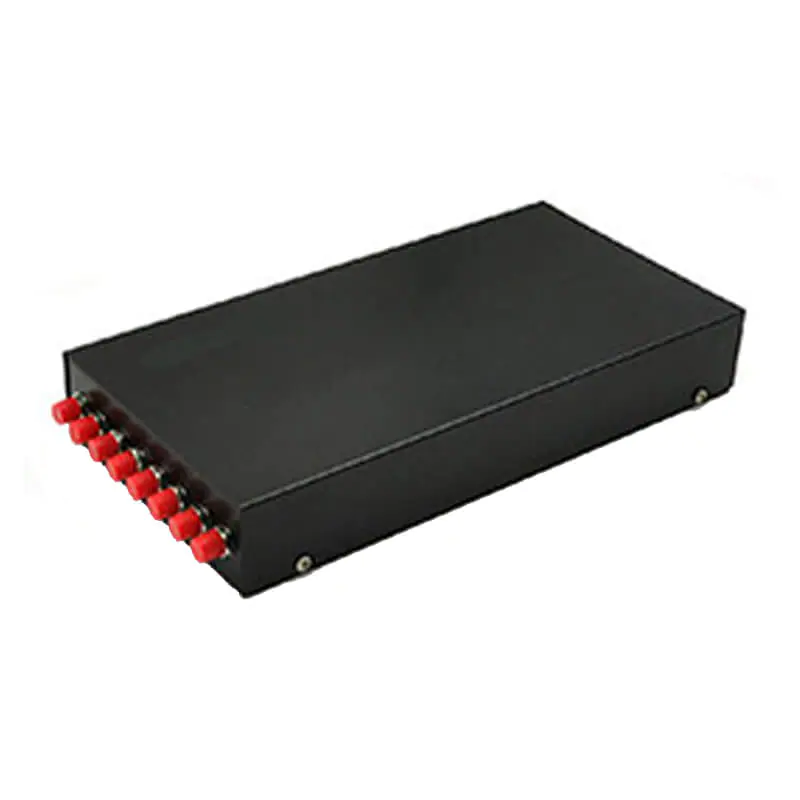

Plan Cable Management Before Filling the Panel
Patch cords should reach their destinations without pulling on the connectors or blocking access to unrelated ports. Choose routes that make the intended connection easy to identify and maintain. Store spare length in suitable management features instead of leaving loose loops across equipment.
Follow the cable and component manufacturers’ bend-radius requirements for the actual product and installation condition. Avoid applying a single radius to every patch cord, buffered fiber and cable construction. Check bends at the panel entry, tray guides, front managers and connector boots.
A sliding drawer must be evaluated in both its closed and service positions. Confirm that the incoming cable and patch cords have enough managed movement, that fibers are not caught at the rails, and that the drawer can close without pinching a lead. For fixed panels, make sure the relevant connections remain accessible.
The FOA patch-panel routing guidance explains how routing affects port access and bend control. Use the selected enclosure’s installation instructions to turn those principles into a workable cable path.
Maintenance checkpoint: Review the fully populated panel, not just the empty chassis. A technician should be able to identify and service a connection without moving a bundle of unrelated patch cords.
Match Connector Interfaces and the Optical Loss Plan
Specify the fiber type, connector family and end-face polish at each interface. APC and UPC end faces should not be mated directly together. Verify the component specification and labels rather than relying only on color.
The panel enclosure has no data-rate conversion function. Whether a link supports the intended application depends on the installed fiber, interfaces, path length, connection quality and equipment requirements. A product name that includes a speed does not replace the end-to-end design.
Include the relevant connectors and splices in the optical loss allowance. Confirm which interfaces are included in a component’s stated loss so the same connection is not counted twice. For a measured link, use the agreed reference method and test limits for the project.
Inspect and clean connector end faces with suitable tools before mating. Do not look into a fiber or connector to determine whether it is live. After installation, keep unused interfaces protected according to the component instructions and maintain a clear labeling system.
Installation and Acceptance Checklist
- Check the bill of materials. Match the chassis, adapters, pigtails, trays, modules, cable fixing and mounting accessories to the approved configuration.
- Confirm fit before termination. Check mounting, access, entry routes, management space and cover or drawer movement.
- Secure the cable. Use the specified fixing and strength-member provisions so the cable load is not transferred to individual fibers.
- Manage and identify fibers. Follow the approved route, preserve the required bend radius and label splices, adapters and destinations consistently.
- Inspect and test. Verify continuity and polarity, and measure link loss using the project procedure. Add OTDR records where specified; they do not replace every other acceptance check.
- Document the finished installation. Record the port schedule, test results, spare capacity and relevant photographs before handover.
The FOA installation guidance covers handling, termination, testing and documentation. Apply the project specification and applicable local installation requirements, including bonding or grounding where relevant.
Prepare a Clear Patch Panel RFQ
Send a short connection schedule with your request for quotation. Include:
- Rack or wall mounting, available space, access and installation environment.
- Individual fiber count, link count, initial population and planned expansion.
- Fiber type, connector family, polish and adapter arrangement.
- Spliced, directly terminated or preterminated design, including trays or modules.
- Incoming cable construction and dimensions, entry direction and fixing requirements.
- Labeling, test records, packaging, sample review and acceptance requirements.
Compare Foclink’s rack-mounted termination panel and compact wall-mounted panel against the required populated arrangement. For a separate distribution enclosure, the fiber distribution box guide explains how to review cable entries, splice storage and usable capacity.
Ask whether each quotation is for an empty chassis, a partially populated panel or a complete assembly. This distinction makes price and installation comparisons more useful.
Fiber Optic Patch Panel FAQ
Does a patch panel increase network speed?
No. It organizes passive optical connections. Application support depends on the complete fiber path, interfaces, loss and active equipment.
Can a 24-port panel terminate 48 fibers?
It can if “24 ports” means 24 duplex adapter positions and the internal design supports 48 fibers. Verify the actual adapter, termination and tray arrangement instead of assuming the count.
Is a sliding panel always better than a fixed panel?
No. A drawer may improve service access, but it needs space and controlled cable movement. Compare the service procedure and routing for the proposed location.
Can an empty patch panel be installed without additional parts?
Mounting may be possible, but optical termination normally requires the specified adapters, pigtails, trays or modules and fixing accessories. Confirm the complete bill of materials.
How much expansion space should be reserved?
Use the project’s growth plan and service requirements. Reserve usable adapter, tray, cable-entry and management capacity together; there is no universal spare percentage for every installation.
Specify a Panel That Can Be Installed and Maintained
The right fiber optic patch panel combines a clear capacity definition with suitable mounting, protected fiber routing and practical service access. Confirm the populated layout, interfaces and acceptance requirements together before ordering.
Send Foclink your fiber schedule, mounting details and connector requirements. We can discuss the panel configuration and clarify which components are included in the quotation.